
Support
Advice and answers from the NetRadar.io team
Integrations
Product import
Enable products for monitoring
Integrations
Integration with Wannafind
Here you can read about how to integrate Price Monitoring with your Wannafind
Activating the Wannafind Integration
- Login to Netradar.io price monitoring via https://app.netradar.io/
- Select the menu item 'Integration' on the far right and then 'Platforms'

- Click the 'Enable Wannafind' button
Setting Up the Integration with the API
- Enter your domain name, including 'http://' or 'https://', for example, https://minshop.dk

- Open a new browser window and log in to the administration of your Wannafind
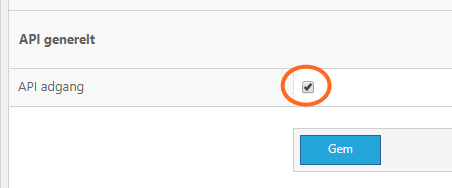
- Go to 'Control Panel' and select 'API'
- Check that API access is activated. If not, mark it as enabled and click Save
- Now go to 'Administrative users' - also under 'Control Panel'

- Click on 'Create administrator user' at the top right
- Enter an email address and password. If you do not have an e-mail address that is not already used for another user account, you can write a fictitious one. At 'Access to', select 'API'. Then click 'Save'
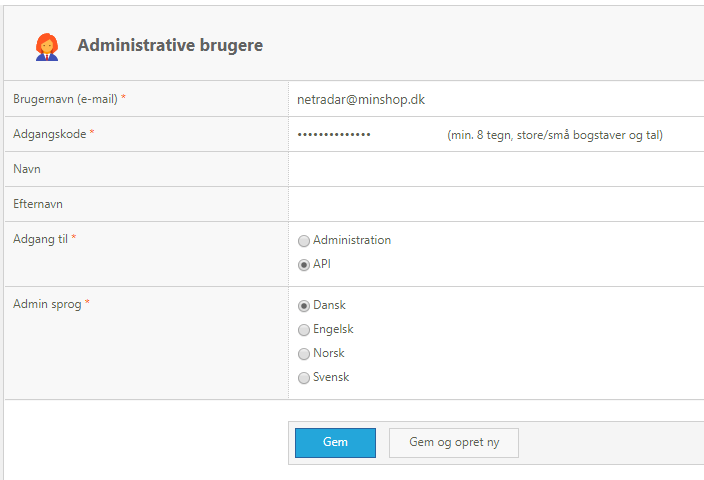
- You should now receive confirmation that the user has been created like this:

- Go back to the setup in NetRadar.io and insert the email address as the username and the password as the API key

- Click the green 'Save' button in NetRadar.io
- If the API user is functional and a connection is established, you will see a status page indicating that the integration is activated.
If you get an error message or just need help establishing the integration, just contact us at support@netradar.io or call +45 77 34 34 34.
Your products we are now being read in for the price monitoring. Depending on how many products you have, it will take approximately 5 minutes for every 1000 products.