
Support
Integration with Magento 2.x
If you have Magento 1.7, 1.8 or 1.9, you should use this guide instead .
Get Access Token
Create Access Token in your Magento shop.
You do this by first logging into the administration of your Magento shop and going to 'System' -> 'Integrations'.
Click on 'Add New Integration' in the top right corner.
Here, on the Integration Info tab, enter the name e.g. Price monitoring and your password. On the API tab, Resource Access must be set to 'All'

Then click 'Save' in the top right corner.
You must use the one called 'Access Token' for the integration in Price Monitoring.
Integrate your Magento shop with price monitoring
Open the price monitor and go to 'Integration' -> 'API'
Here you select 'Enable Magento'.
When the integration is activated, you must enter your domain name and your Access Token as well as possibly the field names you use for the barcode and/or brand.
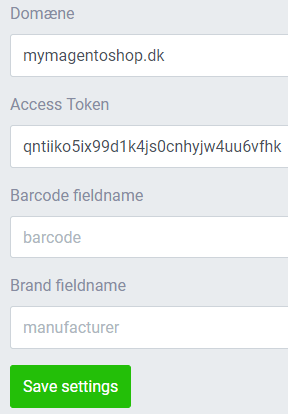
If, in connection with your product creations, you have created attributes for 'Barcode' and/or 'Brand/Supplier', then these can be automatically downloaded into Price Monitoring. Then you just have to indicate which names you have given them.
If you have not created these attributes, you can just leave the fields empty.