
Support
Advice and answers from the NetRadar.io team
Integrations
Product import
Enable products for monitoring
Integrations
Integration with DanDomain
Here you can read about how to integrate Price monitoring with DanDomain
Activate the DanDomain integration
- Login to Netradar.io price monitoring via https://app.netradar.io/
- Select the menu item 'Integration' on the far right and then 'Platforms'

- Click the 'Activate Dandomain' button

Set up the integration with API keys
- Enter your domain name including http:// or https:// – e.g. https://minshop.dk

- Open a new browser window and log in to the administration of your DanDamain
- Go to 'Settings' and select 'Integration'

- Click at the top on '+ Add new user'
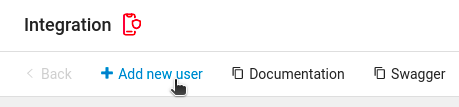
- Write a name for the user and give access to create, read and update for product

- Click 'Save' at the top
- You first see the API key that has been created. Click icon to have it copied

- Go back to the setup in NetRadar.io and paste the API key in the 'Access Token' field

- Choose whether your prices are stated with or without VAT in your DanDomain. Standard is with VAT.
- Click the green 'Save' button in NetRadar.io
- If the API user is functional and a connection is established, you will see a status page indicating that the integration is activated.
Should you encounter any errors or require assistance, please contact us at support@netradar.io or call +45 77 34 34 34. Your products are now being processed for price monitoring. The duration depends on the quantity, with an average of approximately 5 minutes for every 1000 products.