
Support
Integration with Smartweb
With the built-in integration for SmartWeb, your products are automatically retrieved and updated in your NetRadar.io monitoring of the market. It also allows your prices to be automatically updated around the clock via the rules you set up in repricing .
The integration supports both multi-site, multiple currencies and languages. You can also decide which customer groups in your Smartweb should be automatically priced (so you avoid changes for B2B customers with special agreements on prices, for example).
Activate the Smartweb integration
- Login to Netradar.io price monitoring via https://app.netradar.io/
- Select the menu item 'Integration' on the far right and then 'Platform'

- Click on the 'Enable Smartweb' button

Set up the integration with the API
- Enter your domain name including http:// or https:// – e.g. https://minshop.dk

- Open a new browser window and log in to the administration of your Smartweb
- Go to 'Settings' and select 'API'
.png)
Click "Create API client" on the top-right corner

Enter the name of new API client:
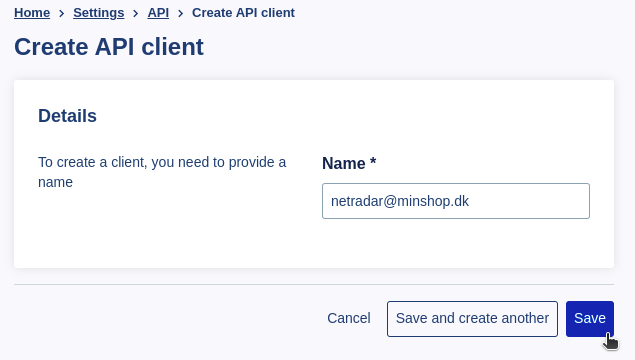
Don't forget to click "Save"
Integrate your Price Monitoring with Smartweb
Go back to the setup in NetRadar.io and insert the email address as the username and the password as the API key

- Choose whether your prices are stated in your Smartweb with or without VAT (you can always change that setting again if you are in doubt)
- Click on the green 'Save settings'
- If the API user works and there is a connection, you now get this page where you have to choose which shop, language and currency (if you have more than one of them):
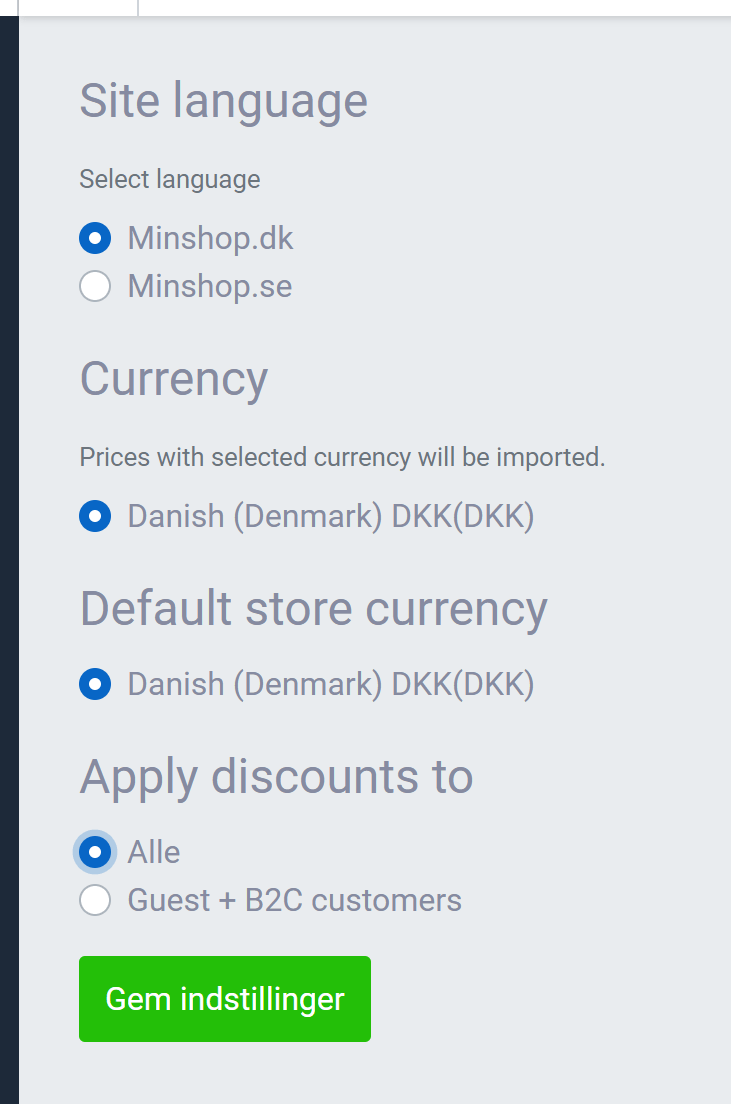
- At the bottom you choose whether prices changed from NetRadar.io should apply to everyone or “ Guests + B2B customers”. This depends on whether you have pricing for specific customer groups in your Smartweb and how these should apply in relation to prices set in relation to the market. If you are in doubt, select "Guests + B2B customers".
- Once you have chosen, click again on the green 'Save settings'. The integration is now set up :)
Should you encounter any errors or require assistance, please contact us at support@netradar.io or call +45 77 34 34 34.
Your products are now being processed for price monitoring. The duration depends on the quantity, with an average of approximately 5 minutes for every 1000 products.