
Product matching
Use the Matching tool to review, optimize and approve the competitor matches NetRadar.io suggests for your products.
The 'Matching' tool in NetRadar.io gives you an efficient overview of competitor matches for your products.
After you add a new product, allow some time for it to be analysed. The system will then suggest competitor matches automatically. A good practice is to add products today and optimize the matching tomorrow.
Before you start: allow pages to be shown in the tool
To avoid switching between browser windows, you can view the competitors' product pages inside the matching tool. However, many websites block being displayed in a so-called iFrame by default. Before you get started, you should therefore install a browser plug-in that can remove this block in most cases. See how here: www.goldenplanet.com/support/browser-tip/
Use the matching tool
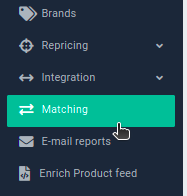
You will find the matching tool in the menu on the left:
This short video shows how to use the matching tool:
In addition to the automatic competitor matches, you can add competitors yourself if you know of others.
This gives you a thorough competitor analysis, so you can stay ahead of the market with your pricing strategy.