
Report an issue with a competitor
Report wrong prices, missing VAT, incorrect stock information or other problems with a competitor – and get it fixed quickly.
We are committed to giving you a seamless experience with NetRadar.io price monitoring. If you do run into an issue, we are here to help. This article shows you how to report a problem, so we can fix it quickly and keep everything working as it should.
Identify the problem
Before you report an issue, take a moment to pinpoint the specific problem. It could be inaccurate price data, missing VAT in a competitor's price, incorrect stock information, a missing image etc.
Open the report window
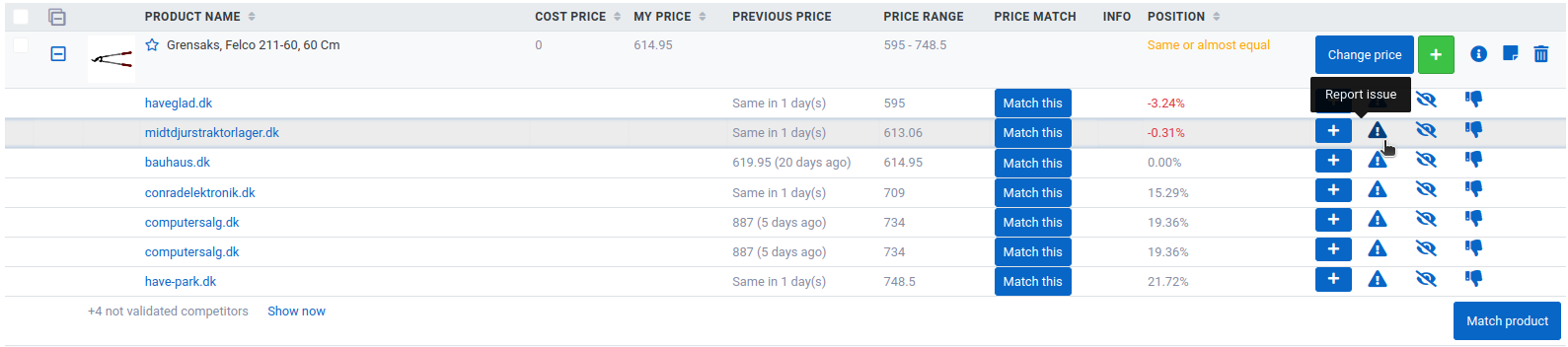
Expand the product and click the warning icon ("!") on the far right next to the competitor in question ('Report issue'):
Describe the problem
In the window that opens ('Broken URL report'), select what the issue is about:
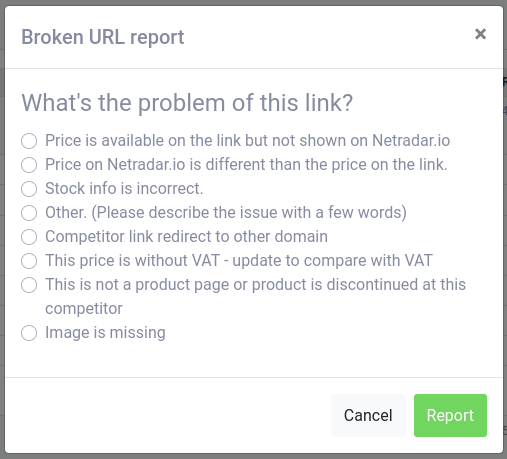
When you have selected the problem, click 'Report'.
"Check variants" report
If the competitor's product has different variants on the same page, but they are not retrieved into your NetRadar.io, we suggest reading Products with variants.
Note: Please don't report an issue more than once per competitor domain. Once one of the competitor's products has been fixed, all other products from that competitor are updated as well.
As soon as the reported competitor has been fixed, you will be notified by e-mail.