
We're committed to providing a seamless experience with our price monitoring app. However, if you encounter any issues or problems, we're here to help. This article will guide you through the process of reporting a problem, so we can address it promptly and ensure the app continues to function optimally.
Before reporting an issue, take a moment to pinpoint the specific problem you're experiencing. This could be related to inaccurate price data, absence of VAT in competitor price, incorrect stock info, missing image etc.
Open a report popup window of needed competitor that is marked as "!" on the far right.
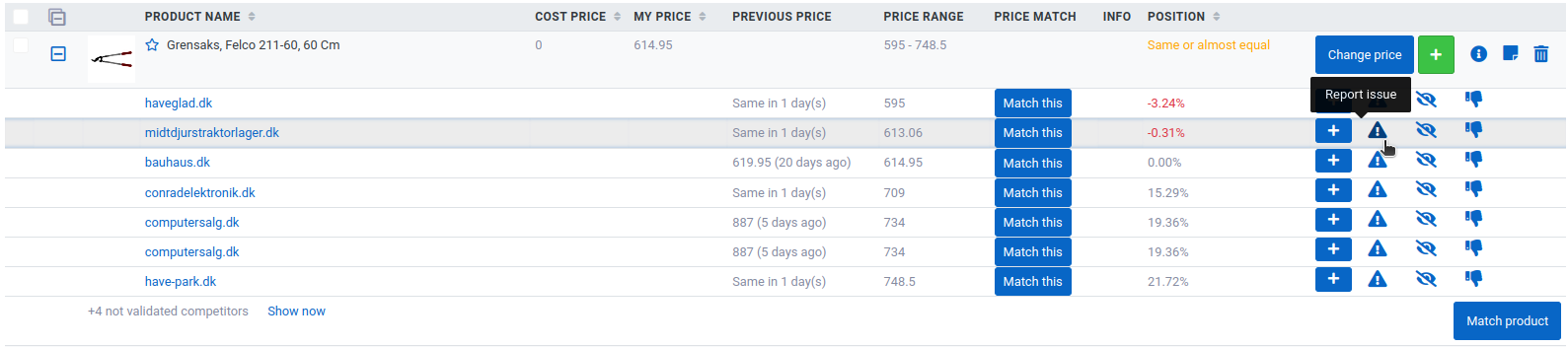
In popup window you can select what current issue is related to.

After selecting the problem press "Report".
If competitors' product has different variants presented on the same page but they are not fetched to your Netradar.io - we suggest reading this article.
NOTE: please do not report an issue more than once per competitor domain. Once one of the competitor product is fixed - all other products will be updated as well.
As soon as reported competitor is fixed you'll be informed by email.